FlowInquiry v1.2.4 - A Complete UI Transformation for Better Productivity
The best tool is the one that gets out of your way.
You shouldn’t need to hunt for buttons, navigate through nested menus, or figure out where to create a ticket. Your project management system should feel obvious, fast, and built for the way you actually work.
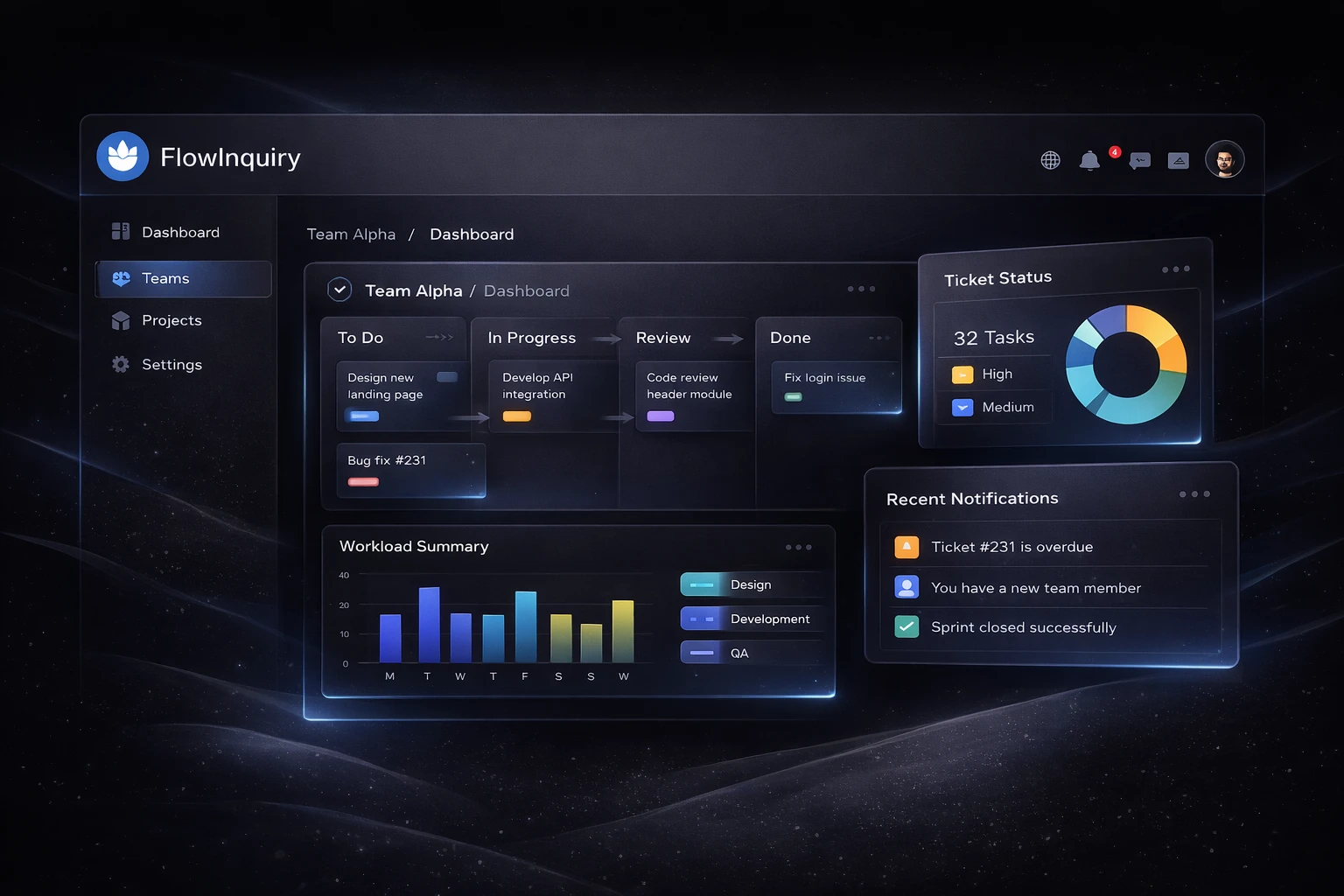
FlowInquiry v1.2.4 delivers exactly that. We’ve completely revamped the user interface from the ground up, making it easier to navigate, faster to create and edit tickets, and more intuitive for everyone on your team.
A User Interface That Actually Works With You
This is the biggest change in v1.2.4, and you’ll notice it the moment you log in.
We rebuilt the entire interface with one goal: make every interaction faster and more natural. No more clicking through multiple screens to create a ticket. No more losing your place when navigating between projects. No more interfaces that feel like they were designed for the software, not for you.
Navigation that makes sense. The new layout puts your most important actions within reach. Jump between projects, switch views, and access settings without breaking your flow.
Creating and editing tickets is now effortless. We streamlined the forms, reduced unnecessary clicks, and made the experience feel instant. Whether you’re logging a customer issue or updating a sprint task, it just works.
User-centric design throughout. Every button, every transition, every workflow has been rethought to match how teams actually use project management tools. Less friction. More focus.
The result? Your team spends less time learning the tool and more time using it to get work done.
A Reporting Engine Built for the Future
Good decisions require good data. But most tools either give you too little insight or drown you in metrics that don’t matter.
v1.2.4 introduces our new reporting engine, a foundation we’ll build on to give you deeper insights into how your team works. This release includes our first set of reports:
- Aging reports show you exactly how long work has been sitting, so you can spot bottlenecks before they become problems
- Aggregated ticket views give you a clear snapshot of status, priorities, and workload across all your projects
- Export to CSV and Excel lets you share data with stakeholders in the format they need
This is just the beginning. We’re building a reporting system that will grow with your needs, adding new views and analytics that help you understand patterns, predict delays, and optimize how your team delivers.
These aren’t vanity metrics. They’re insights that help you make better decisions about what to prioritize, where to add resources, and how to improve your processes.
Everyone Sees the Same Thing, At the Same Time
Miscommunication costs time. Outdated information costs trust.
This release brings instant updates across your entire team. When someone moves a ticket, changes a priority, or closes an iteration, everyone sees it immediately. No manual refreshes. No wondering if you’re looking at old data.
Your support team knows the moment engineering picks up their escalation. Your project manager sees sprint progress update live. Your stakeholders watch the board move forward without needing to ask for status updates.
Real-time visibility means faster decisions and fewer meetings.
Close Sprints Confidently and Plan What’s Next
Finishing a sprint shouldn’t feel like administrative overhead.
Now you can close iterations with one click and immediately see what shipped, what didn’t, and why. Use that insight to plan your next cycle with confidence.
The system helps you maintain consistency with automatic sprint naming, so your team always knows which iteration you’re discussing. And project status tracking gives you a complete audit trail of every milestone, from kickoff to delivery.
When your workflow reflects how your team actually works, planning becomes easier and execution becomes smoother.
Never Let a Deadline Slip Silently
The most expensive tickets are the ones nobody remembers.
This release adds automatic notifications for overdue work. When a ticket misses its deadline, the right people get alerted automatically. No more manual checking. No more surprises in retrospectives.
Your customers get faster responses. Your team stays accountable. And you can trust that nothing important falls through the cracks.
Built to Scale With Your Business
While you see better reporting and real-time updates, we’ve also strengthened the foundation that powers everything.
The platform now handles multiple tenants more reliably, processes background jobs more efficiently, and runs faster under load. We’ve simplified the codebase, improved performance, and made the system easier to maintain as your usage grows.
These improvements mean FlowInquiry stays fast and stable whether you have 10 users or 1,000.
What This Means for Your Team
The new UI makes onboarding instant. New team members can start contributing on day one because the interface is intuitive. No lengthy training sessions. No confusion about where things are.
For support teams: Create tickets faster, track aging issues automatically, and ensure nothing stays unresolved too long.
For project managers: Navigate between projects effortlessly, close sprints with confidence, and share progress without manual reporting.
For executives: Get reliable insights into team performance and project health without disrupting your team’s workflow.
For growing companies: Scale your operations with an interface that stays fast and a reporting engine that grows with you.
v1.2.4 helps you work smarter by making the interface invisible and the insights obvious.
What’s Next
We’re not stopping here. The reporting engine and UI foundation in v1.2.4 set the stage for even more powerful capabilities.
Custom fields for your unique workflows. Every organization works differently. Soon you’ll be able to add custom fields that match your specific requirements, whether that’s warranty claim numbers, client budgets, or compliance checkboxes.
Build the reports you actually need. The reporting engine we launched in v1.2.4 is just the start. We’re adding the ability to create custom reports tailored to your team’s metrics, so you can track exactly what matters to your business.
Let the system run itself. We’re expanding automation so more of your project management happens in the background. Smart routing, automatic escalations, and intelligent task assignments that reduce manual overhead and keep work flowing.
These features will help you customize FlowInquiry to fit your business, not the other way around.
Get Started Today
Ready to give your team better visibility and faster workflows?
Install FlowInquiry for free and start using the Community Edition today. No credit card required. No time limits. Just powerful project management that works.
View the full release notes on GitHub to see every improvement, fix, and enhancement in v1.2.4.
Star us on GitHub to follow our progress and join the open-source community building the future of project management.
Upgrading from an earlier version? Check the release notes for migration guidance and breaking changes.
Thanks to everyone who contributed to this release. Your work helps teams around the world deliver better results.
The FlowInquiry Team
Table of Contents
Related Articles

🚀 FlowInquiry v1.0 is Officially Released!
FlowInquiry v1.0 is officially live! 🎉 This release marks a major milestone in workflow automation, bringing enhanced team collaboration, customizable workflows, and seamless integrations. Whether you're managing customer requests or streamlining internal processes, FlowInquiry empowers teams to work smarter and faster. Dive into the latest features and improvements that make this the most powerful version yet! 🚀
FlowInquiry v1.2.2: Laying a Strong Foundation for What’s Next
FlowInquiry v1.2.2 delivers a clean database refactor for easier data migrations, expanded automated testing, and refreshed documentation—laying the foundation for upcoming project-management features and smoother future development.
Self-Host FlowInquiry with a Single Command – Fast, Easy Setup
FlowInquiry makes self-hosting simple. With just one command, you can launch the full platform — including backend, frontend, and database — on your local machine or server. No complex configuration required